 FlashTrack
The route list climbers actually check
An app for climbing and bouldering gyms. Setters add routes in the panel, climbers log ascents and vote on grades on their phones, and competitions score themselves — from sign-up to ranking.
No account, no login — a sample gym with sample data.
Also works with Claude and ChatGPT: ask about your gym in your own wordsNew routes
- 6b+OverhangLeadKate14 ascentsNew
- 6ACaveBoulderTom31 ascentsNew
- 7aVerticalLeadKate3 ascents
- 5cSlabTop ropeOla22 ascents
- 7ACaveBoulderTomNo ascents yet
FlashTrack in numbers
- for gyms until 31 December 2026 — full version during the pilot
- €0
- for climbers — always, on every plan
- €0
- apps to install — a browser is all you need
- 0
- per month per gym from 2027 — €25 for pilot gyms for the first 6 months
- from €50
FlashTrack in 20 seconds
Instead of paper, whiteboards and spreadsheets
What many gyms still keep on paper and in their staff’s heads lives in one place in FlashTrack.
Without FlashTrackA route list on a whiteboard or a sheet of paper, out of date a week after the reset.
With FlashTrackA route list on every phone, up to date the moment a setter adds a route in the panel.
Without FlashTrackSetters guess which routes are sandbagged and which ones nobody climbs.
With FlashTrackGrade votes, felt grades and ascents on every route — plus a list of routes to regrade.
Without FlashTrackCompetitions on paper score cards, results typed into a spreadsheet late into the night.
With FlashTrackSign-up by link or QR code, scoring in the panel and a ranking calculated live.
Without FlashTrackClimbers don’t know what’s new and ask at the front desk.
With FlashTrackNew routes and the gym ranking on a TV screen in the gym and in the app.
Without FlashTrackPosters and social media graphics designed from scratch every time.
With FlashTrackA ready-made poster, post, story and route tags with QR codes — downloaded from the panel.
Features for gyms
The staff panel for your climbing gym — everyday work with routes, people and competitions.
Staff panel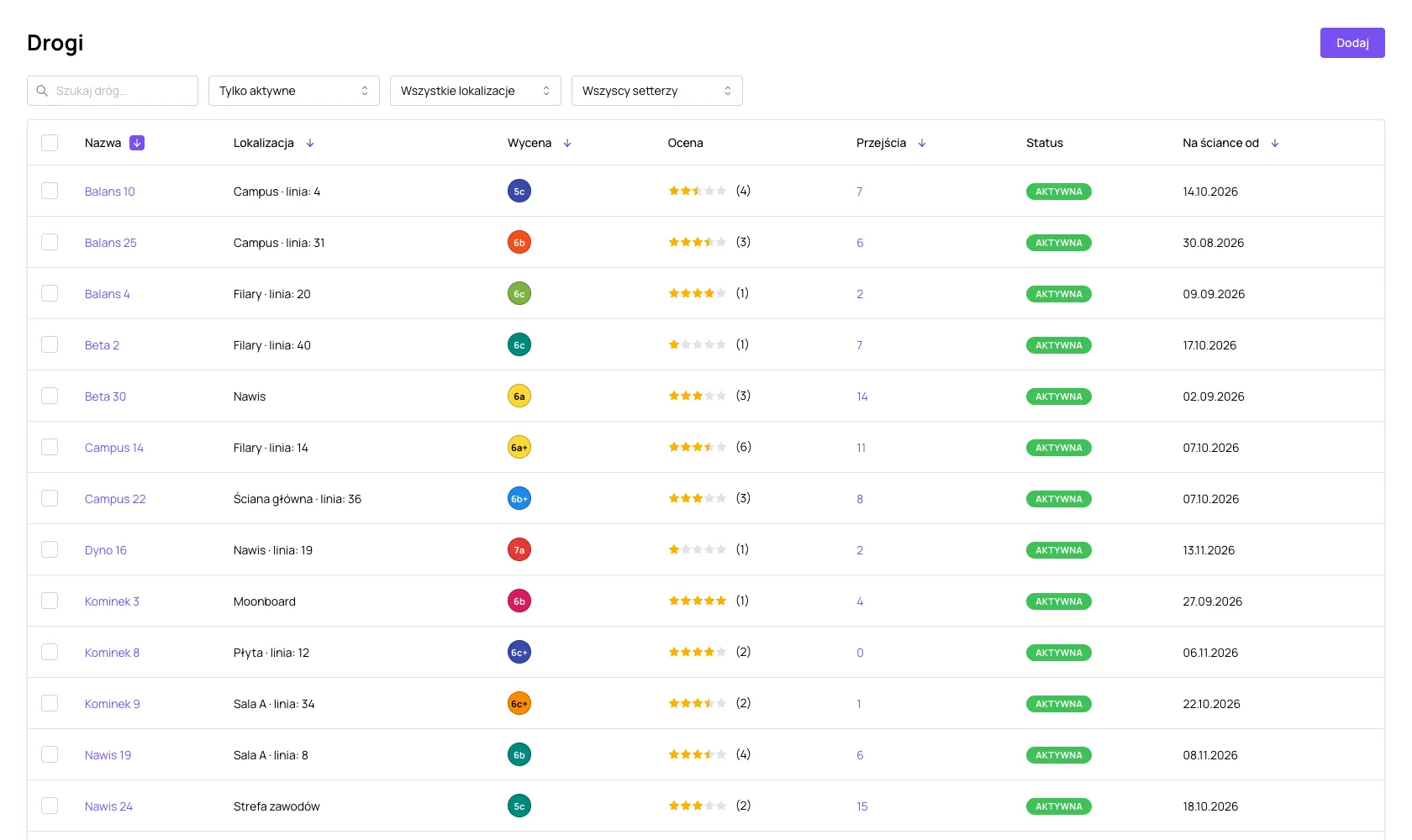
- Up-to-date route list
- Add and edit routes and boulders: grades, sectors, hold colours, wall locations and climbing type. Filter the list as the number of routes grows.
- Ascents and grade votes
- Route details show who climbed it and how they graded it — the whole history in one place, no notes to collect.
- Setters
- Every route shows who set it. Quickly browse a setter’s routes and see how climbers rate them.
- Members and front desk
- A list of the gym’s climbers, invitations and account confirmation after sign-up. A simple flow: the climber asks the front desk to confirm.
- Gym settings
- Name and logo, the colours used for routes, areas and sectors, and the grade scale — French, Kurtyka or Font, separately for roped routes and boulders.
- Team roles
- Setters work with routes. The front desk handles people and competitions. Admins have full access to settings and the team.
Data for setters and managers
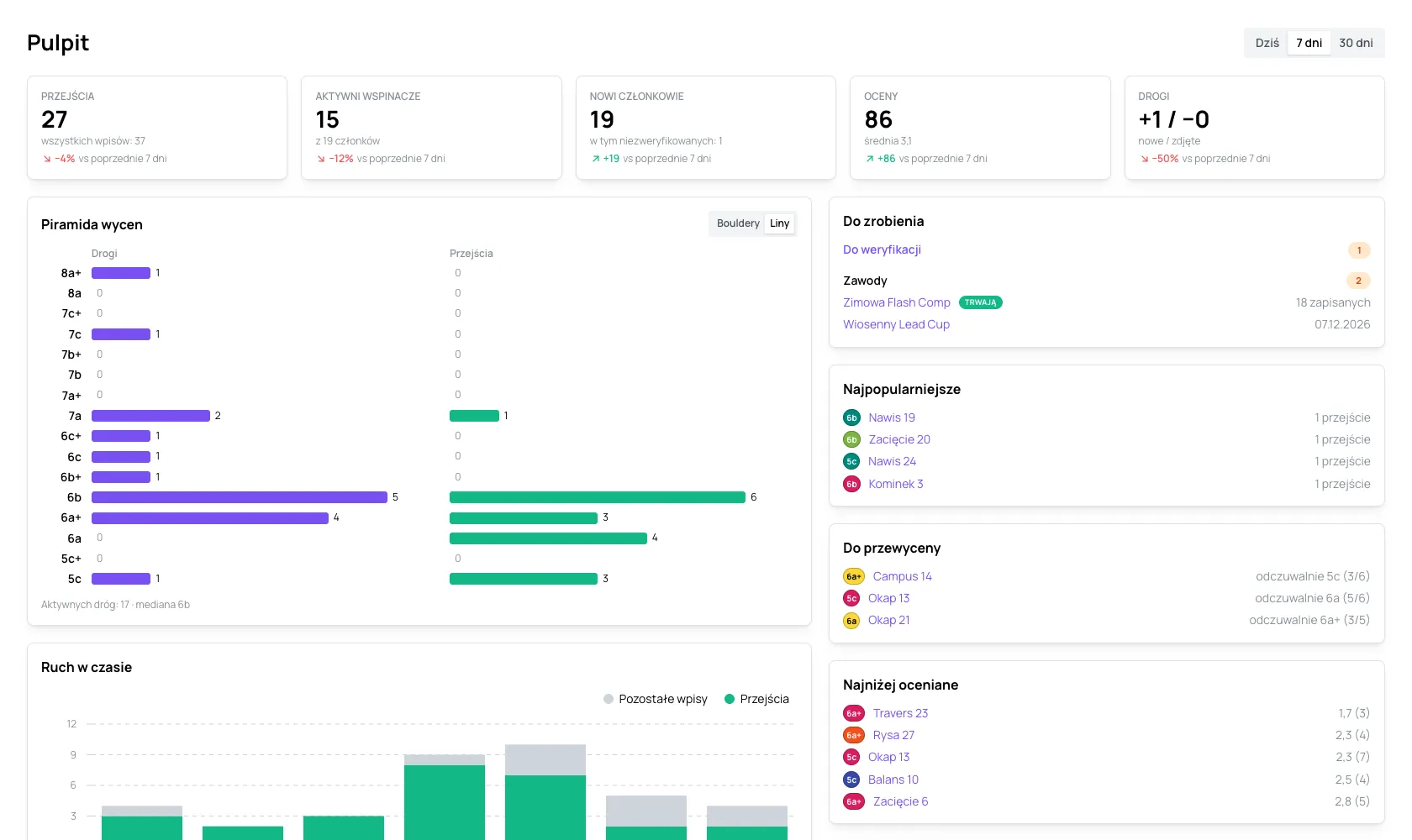
The panel dashboard shows how your gym is doing on one screen: traffic, ascents, grade votes and whether your routes match what people actually climb.
- Grade pyramid
- How many routes you have at each grade and how many ascents were logged on them — you see right away where routes are missing and where there are too many.
- To regrade
- Routes that climbers consistently grade differently from the setter, with the felt grade and the number of votes.
- Most popular and least liked
- Routes with the most ascents, the lowest-rated ones and the ones nobody has logged yet — a ready list for the next reset.
- Activity over time
- Ascents, active climbers and new members compared with the previous period, plus a heatmap of the hours when people climb.
Features for climbers
A phone-first app with nothing to install. Climbers create their own account; the front desk only confirms they’re a member.
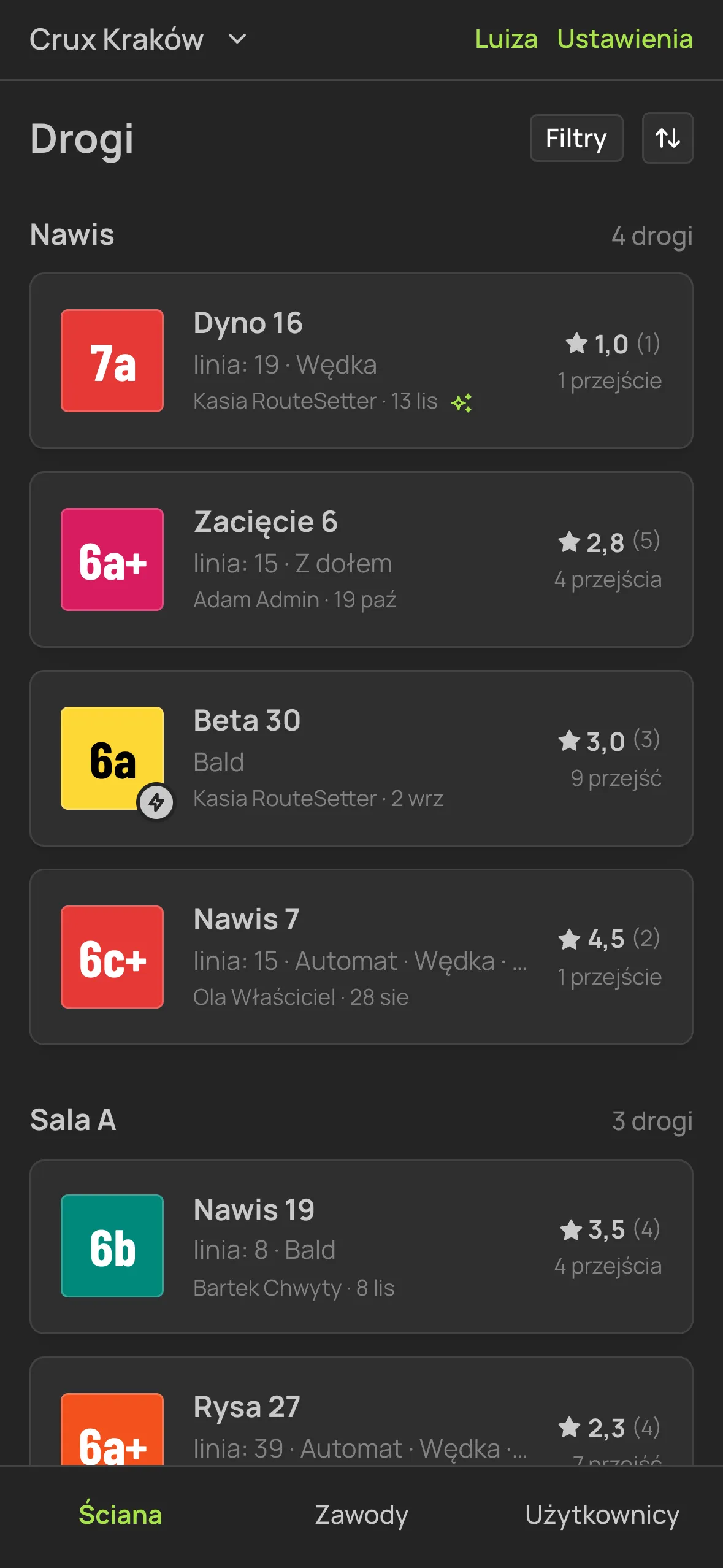
Live route list
Routes and boulders filtered by area, grade and type. Each shows its hold colour, setter and average rating. Browsing needs no login.
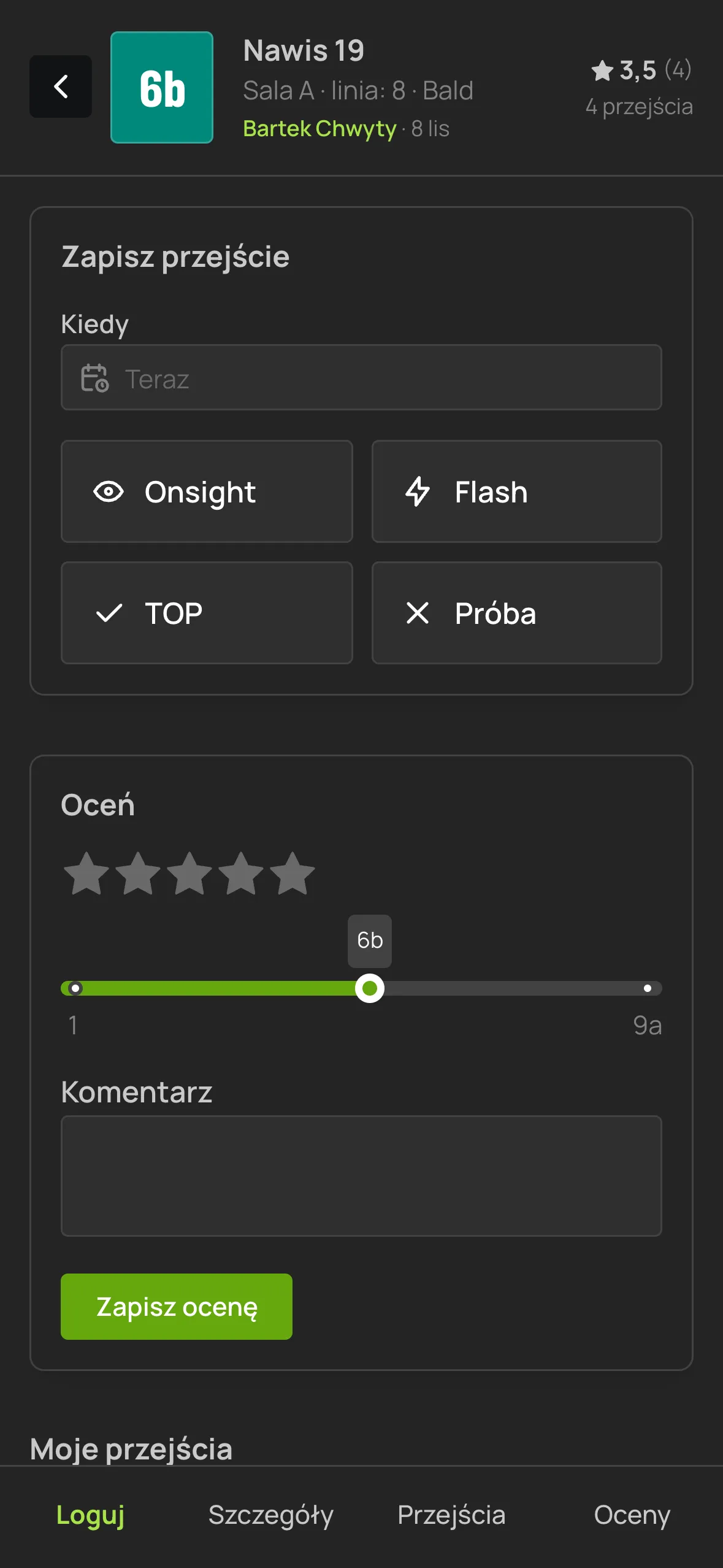
Logging an ascent
Onsight, flash, top or attempt — one tap. Plus stars and a felt grade for the setter.
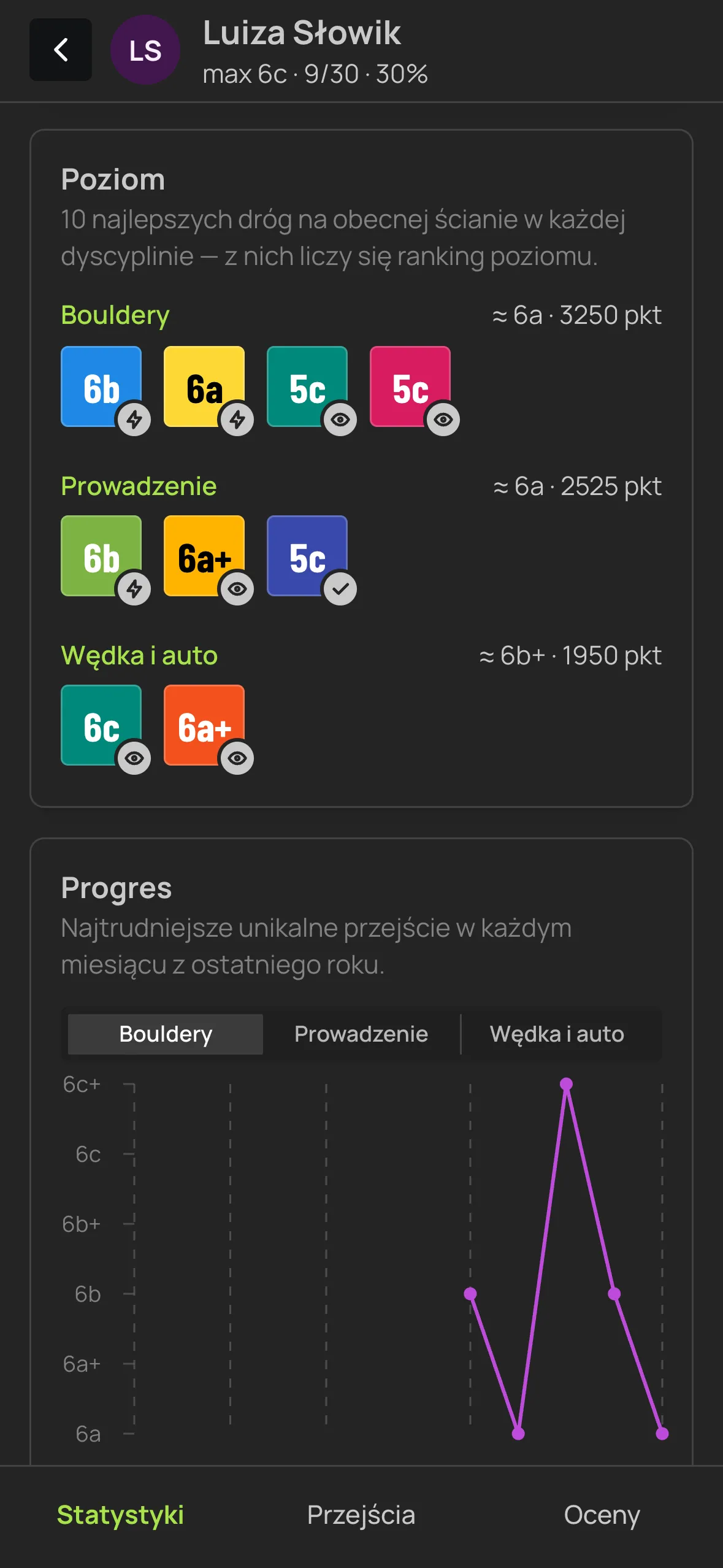
Profile and progress
Level in each discipline, hardest sends month by month and the full history. Profiles can be public or private.
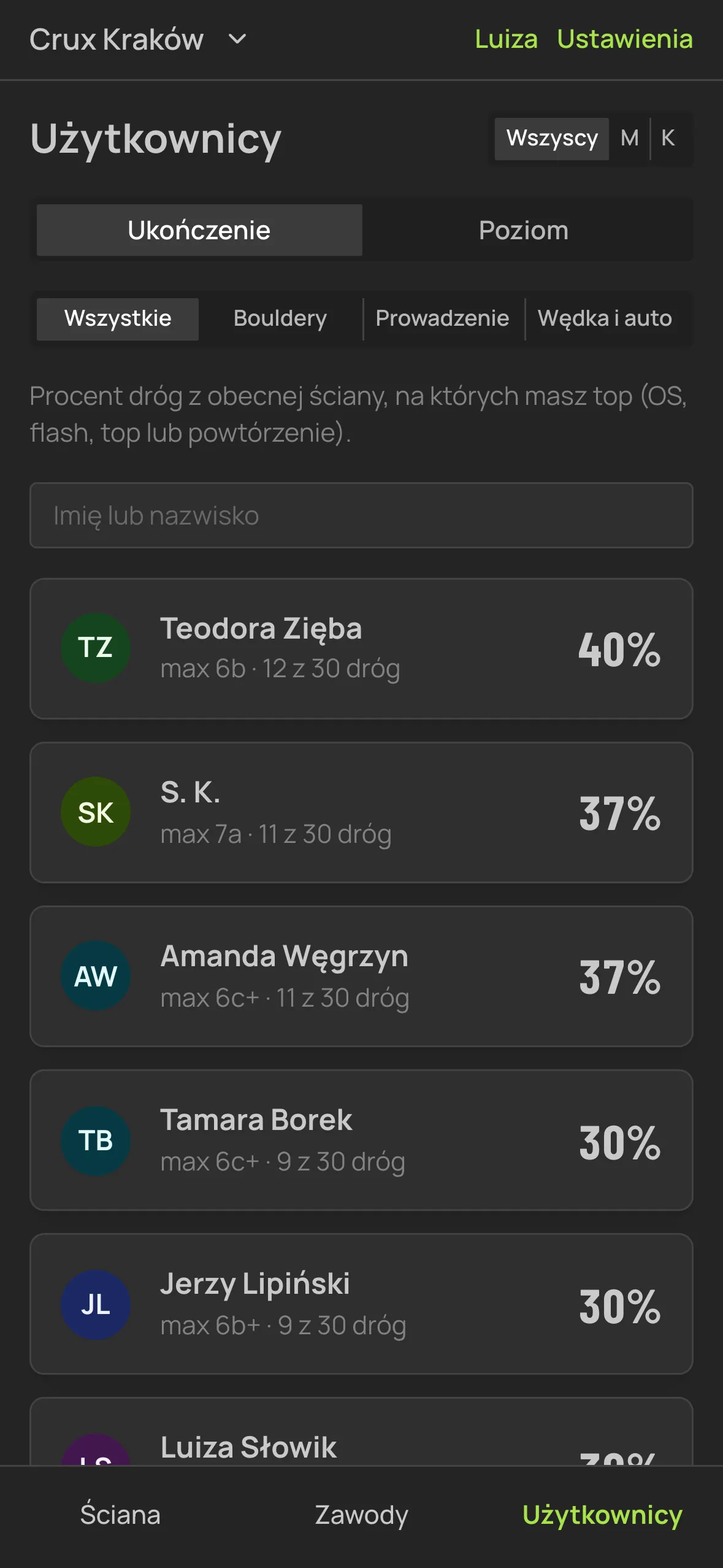
Gym ranking
Who has climbed the most of the current wall and who climbs hardest. Private profiles appear without a name — not even initials.
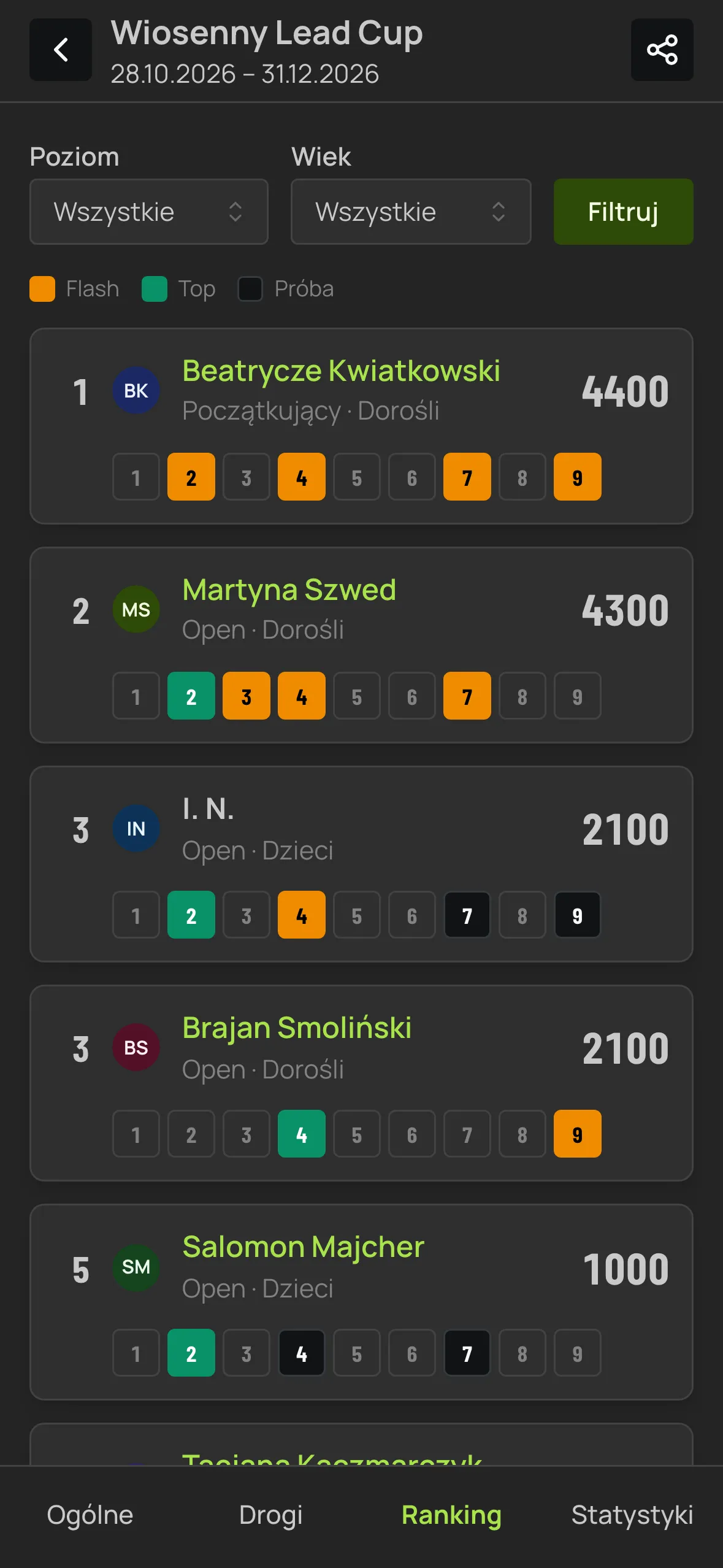
Competitions
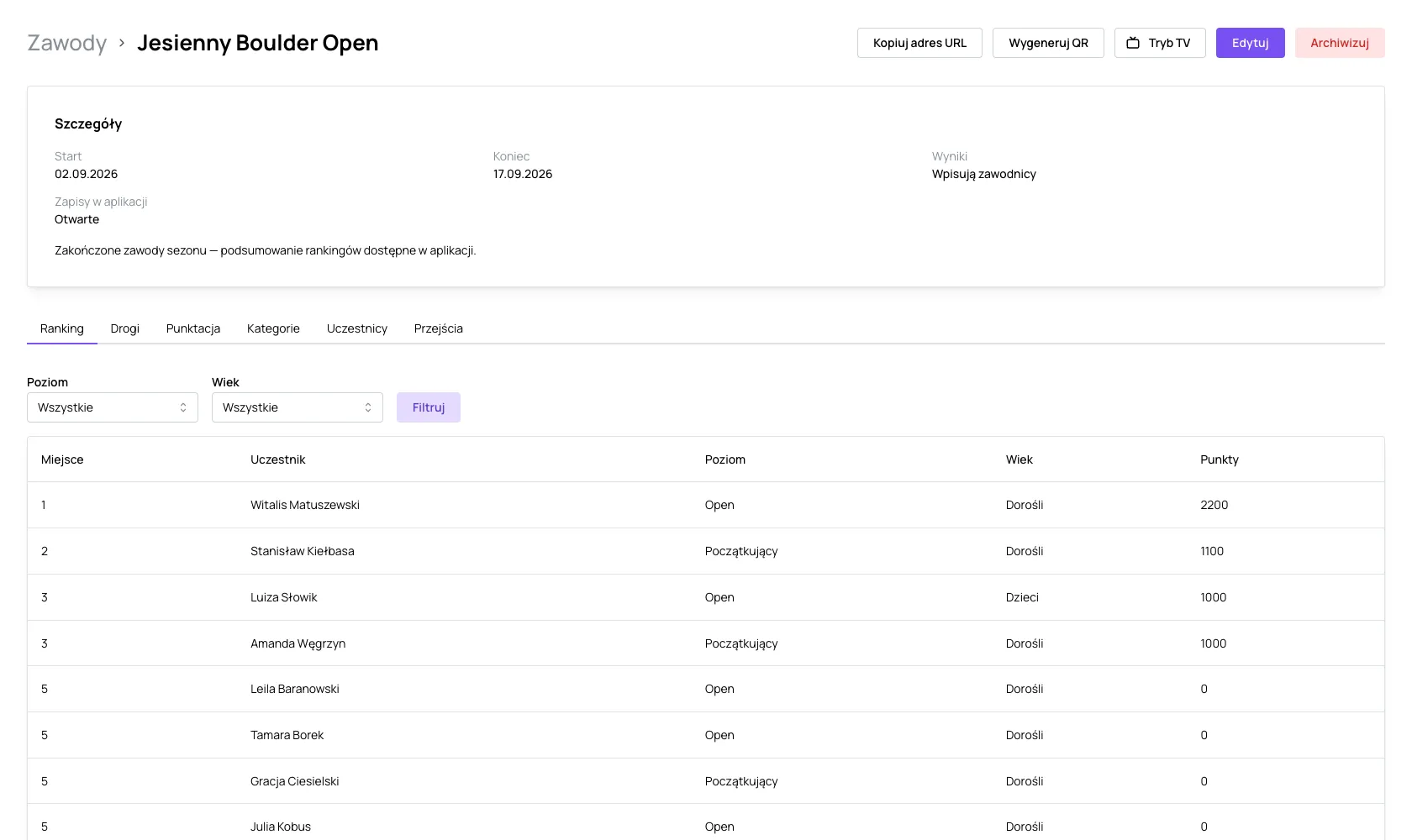
Sign up with a link or QR code, see the competition routes and a ranking that updates with every ascent.
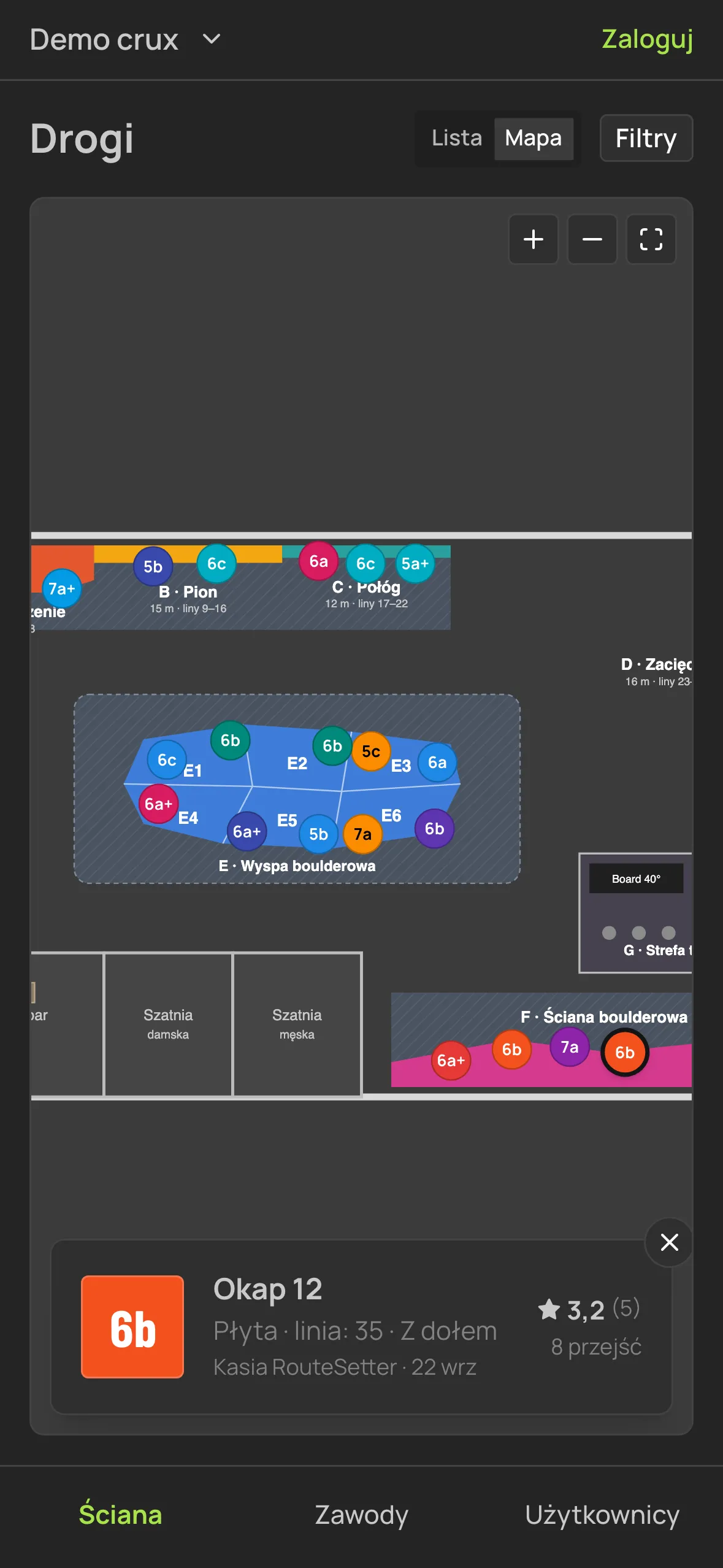
Map in the climber app: dot → route card
Interactive gym map
Your floor plan with every active route as a dot. A climber standing in the gym sees what’s in front of them right away — no scrolling through a list.
- Dot = route
- The dot’s colour is the hold colour, with the grade inside. Tap a dot to see the route card and open its details.
- Zoom and pan
- Pinch, scroll wheel or the + and − buttons. Fit goes back to the whole gym.
- Same filters as the list
- Grade, area, type and “Hide climbed” work on the map too. Routes you’ve climbed show your ascent icon.
- Easy setup
- An admin uploads the floor plan in the panel, then staff pick a route and click its spot on the plan. The next unplaced route is selected automatically, so you can map a whole sector click by click.
Competitions from announcement to ranking
A climbing and bouldering competition system in the same tool as your everyday route list.
- 1
Staff create the competition
Set up the event, choose the scored routes and decide how many points a top, flash or zone is worth.
- 2
Climbers sign up
Share a link or a QR code. Sign-up happens in the app; if there are categories, climbers pick one when they sign up.
- 3
Logging ascents
During the competition, competitors log their ascents on the competition routes.
- 4
Live ranking
Competitors and spectators follow the results — no copying scores from paper cards.
FlashTrack works with AI
Connect FlashTrack to Claude or ChatGPT and ask about your gym in your own words. The assistant signs in as you and sees what you see in the app — read only.
Click a question. The answers are examples, on demo gym data.
Climbers ask
What new routes went up at Crux this week?
Crux has 5 new routes since Monday. The most climbed:
- 6ACaveBoulder · 31 ascents
- 6b+OverhangLead · 14 ascents
- 7aVerticalLead · 3 ascents
The yellow 6A in the Cave is also the best rated: 4.6 from 12 votes.
What did I climb this month and what is left on the board?
In November you had 6 sessions and 23 new routes, the hardest a 6c+ — your best yet. You have done 41 of the 58 routes on the board. The easiest ones left:
- 5cSlabTop rope
- 6aVerticalLead
- 6a+CaveBoulder
Who leads the bouldering wall ranking?
Bouldering completion ranking at Crux:
- 1Marta K.52 of 58 routes
- 2Bartek W.49 of 58 routes
- 3You44 of 58 routes
You are 5 routes short of second place.
Gym staff ask
How did last week compare to the one before?
The last 7 days against the previous 7:
- ascents
- 1,284+12%
- active climbers
- 187+5%
- new members
- 14−3
- new routes
- 9+4
Tuesday and Thursday between 6 and 8 pm were the busiest.
Which routes should we reset or regrade?
Three routes to look at:
- 6bVertical8 of 11 votes: more like 6a+
- 6cOverhangRated 2.1 on average from 9 ratings
- 5cSlabUp 63 days, no ascents in 4 weeks
Which route problem reports are still open?
3 open reports on 2 routes:
- 6a+CaveLoose hold, 2 reports, oldest 3 days ago
- 6ACaveWrong tag: “the tag says 6B”
How to connect
MCP server URL
https://mcp.flashtrack.live/mcpOn your first question you sign in with your FlashTrack account and approve access. The assistant only sees what you do — other climbers’ private profiles and staff data stay hidden. No extra cost.
Claude
On claude.ai open Settings → Connectors → Add custom connector and paste the server URL.
ChatGPT
Add a custom connector (app) with the same URL — on plans that allow it.
TV screens in your gym
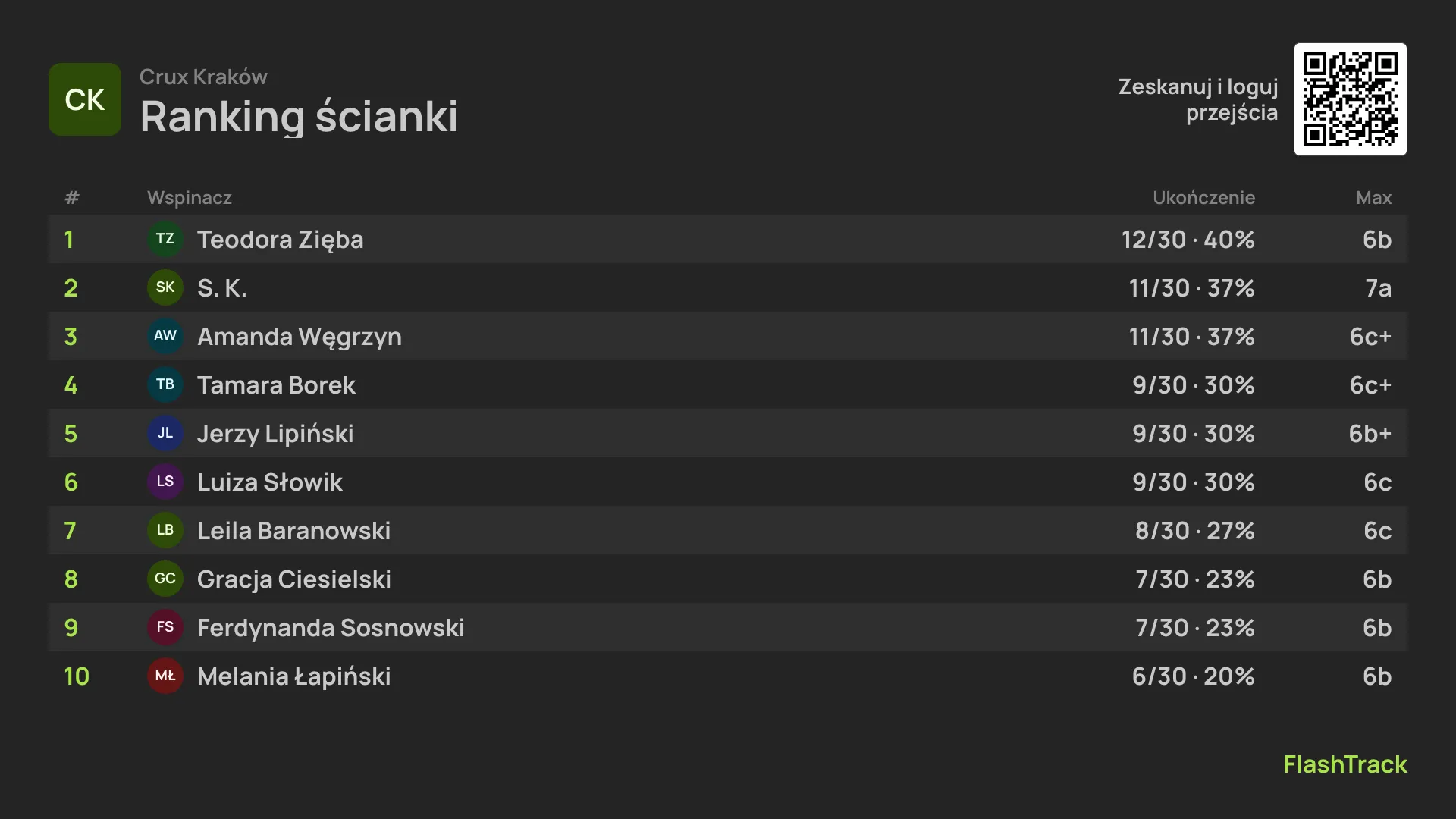
Any TV with a browser or a TV box becomes your gym’s noticeboard. Paste the link once — the screen keeps itself up to date all day.
New routes
Routes from the last 14 days: colour, grade, area and type.
Most popular routes
The routes the most people have topped.
Gym ranking
Your top climbers, respecting their privacy settings.
Live competitions
The ranking of running competitions and their routes with points.
- Landscape or portrait — the layout adapts to the screen.
- A QR code in the corner takes climbers straight to the app.
- No login and nothing to install on the TV.
Materials that bring climbers into the app
Ready-made designs with your gym’s name, logo and QR code. Download them from the panel and print or post them — no designer, no waiting for us.
A4
Front desk poster
“Sent it? Log it.” — a QR code to your gym and three steps to get started. A print-ready PDF.
1080×1350
Post and story
Instagram and Facebook graphics in the same style: a post with a link to your gym and a story with room for a link sticker.
63×88 mm
Route tags
A card by the start of the route: colour, grade, setter, set date and a QR code. Scan it, log the ascent. 9 tags per A4 page.
QR
QR codes
A printable gym QR code, and every route and competition has its own QR code straight to its page in the app.
Get started
From the first message to your first competition — we help at every step of the pilot.
See the demo
Browse the sample gym as a climber or write to us — we’ll show you the staff panel with demo data.
We set up your gym
We help you set the name, hold colours, and areas and sectors to match your gym.
Routes and team
Setters add routes, and you invite your team and assign roles: setter, front desk, admin.
Climbers and your first competition
Share the link to your route list, the front desk confirms accounts, and we set up your first competition together.
Pricing
The pilot is running. Until the end of the year, gyms try FlashTrack for free.
€0for gyms until 31 December 2026
From 1 January 2027: plans from €50 per month per gym.
Pilot gyms pay €25 per month for the first 6 months — January to June 2027.
Nothing moves to a paid plan without your consent.
During the pilot you get the full version: no limits on routes, staff or climbers. We want to test FlashTrack in real gyms and fix whatever gets in the way of everyday work.
Join the pilotIncluded in the pilot
- Staff panel: routes, setters, members and roles
- Climber app: ascents, grade votes, ranking and profiles
- Competitions: sign-up, categories, scoring and a live ranking
- TV screens, posters, graphics and route tags with QR codes
- Onboarding help: routes, team and your first competition
FAQ
Don’t see your question? Contact us
Do I need an account to see the route list?
No — guests can browse routes. You need an account to log ascents and vote on grades.
Do we need to install anything?
No. A browser is all you need. The climber app is built for phones; the staff panel for computers and tablets.
How much does FlashTrack cost?
The free pilot with the full version runs until 31 December 2026. From 1 January 2027, plans start at €50 per month per gym, and pilot gyms pay €25 per month for the first 6 months.
Can I ask ChatGPT or Claude about my gym?
Yes. Once you connect the FlashTrack server (URL and steps in “FlashTrack works with AI”), the assistant answers questions about routes, rankings, competitions and your ascents — and gives gym staff their dashboard data. It is read only and signs in with your account.
Does FlashTrack work for bouldering gyms?
Yes. Every route has a type — boulder, lead, top rope or auto-belay — so FlashTrack works for bouldering gyms and roped walls alike.
Which grade scales does FlashTrack support?
French, Kurtyka (Polish) and Font. The gym picks a scale separately for roped routes and boulders, and rankings and pyramids compare routes regardless of the scale.
How do climbers create an account?
On their own, on their phone: with email and password or with Google or Facebook. One account works at every gym on FlashTrack, and the front desk only confirms that the person is a member of the gym.
Which languages does FlashTrack support?
Polish and English — both the staff panel and the climber app. Everyone picks their own language.
Do climbers pay for the app?
No. The climber app is free on every plan — only the gym pays for FlashTrack.
How do we get climbers to use it?
Just share the link to your gym’s route list, e.g. at the front desk, on your website or on social media. Climbers get hooked on the gym ranking, profiles with their ascent history, and competitions they join via a link or QR code.
Who can see a climber’s ascents and profile?
Climbers decide whether their profile is public — they choose at sign-up and can change it in settings. A private profile appears in the ranking without a name — not even initials.
We have several halls or locations — will it work?
Yes. Within one gym you set up your own areas and sectors. Additional locations are separate gyms in the system, and one person can have an account at several and switch between them without a new password.
What happens to our data if we leave?
Nothing moves to a paid plan without your consent. If you leave, write to hello@flashtrack.live — we’ll help you export or delete your data.